CircuitreePowerBIIntegration
Sync Circuitree queries directly into Power BI as web data sources. Your reports and dashboards update automatically — no manual exports.
CT Addons' Power BI Sync connects your Circuitree data to Microsoft Power BI through auto-updating web data sources. Circuitree queries are exposed as JSON endpoints that Power BI treats as live data sources, so your dashboards, reports, and visualizations always show the latest data. No manual CSV exports, no copy-pasting — just real-time Circuitree data flowing into your Power BI environment.
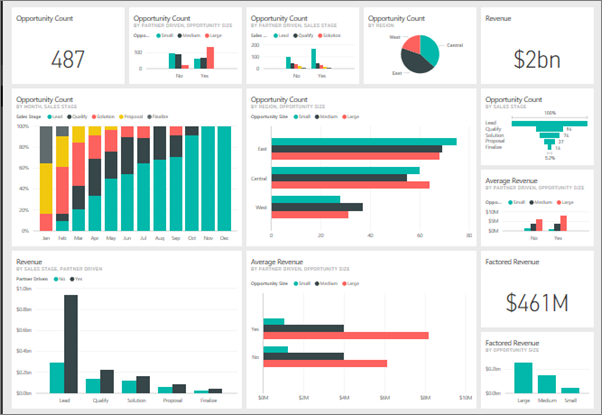
Connect Circuitree Data to Power BI — No Manual Exports
All your Power BI reports, graphs, and tables update automatically through the Circuitree API. No manual data exports, no copy-pasting — just instant, up-to-date data in your Power BI dashboards. Use all of Power BI's visualization, filtering, and sharing capabilities with live Circuitree data. Publish dashboards that your leadership team can access anytime.
How to Set Up Circuitree Power BI Sync
I provide documentation and support to help you get connected.
Connect
Link your Circuitree queries to CT Addons' Power BI Sync
Configure
Add the web data source URLs to Power BI Desktop
Visualize
Build reports, charts, and dashboards that update automatically
What You Can Build with Circuitree Data in Power BI
Registration trend dashboards showing sign-ups over time
Capacity and occupancy reports across events and sessions
Financial summaries with revenue, deposits, and balances
Comparative year-over-year reports
Staff and volunteer tracking dashboards
Executive KPI scorecards shared across leadership
Need a custom dashboard? Learn about my Circuitree development services.
Frequently Asked Questions
Do I need Power BI Pro or Premium?
You can build and view reports with the free Power BI Desktop. To share dashboards with your team online, you'll need a Power BI Pro or Premium license.
How often does the data refresh?
Data refreshes every time you open or refresh your Power BI report. If you publish to the Power BI service, you can schedule automatic refreshes throughout the day.
Can I combine Circuitree data with other data sources in Power BI?
Yes. Power BI supports merging data from multiple sources, so you can combine Circuitree data with your financial systems, Google Analytics, or other tools.
Is the data secure?
Yes. Data is transmitted securely via HTTPS. The web data source URLs are private to your organization.
What Circuitree data can I pull into Power BI?
Any data available through a Circuitree query can be synced to Power BI — registrations, financials, lodging, events, custom queries, and more.
Ready to visualize your Circuitree data in Power BI?
Get in touch to set up Power BI Sync for your organization.
Contact Us