EventAvailabilityforCircuitree
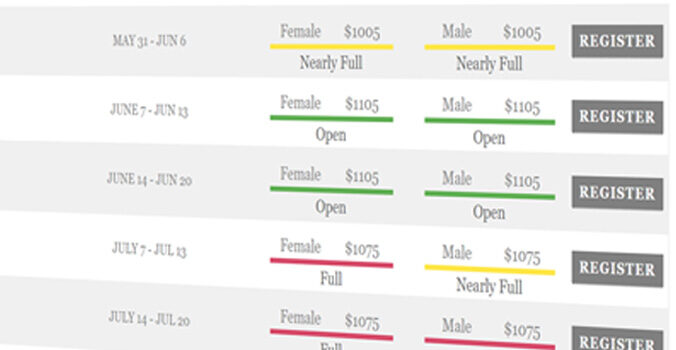
Show "Open," "Nearly Full," or "Full" for every session on your website — pulled live from Circuitree. No manual updates, no guest login.
The CT Addons Event Availability add-on lets any organization using Circuitree display real-time session availability on their public website. A simple shortcode shows each event division's status (Open, Nearly Full, or Full) based on live registration data. When availability changes in Circuitree, your website updates automatically — eliminating manual edits and reducing registration friction.
How It Works — Automatic Availability from Circuitree
Add a simple shortcode to any page on your website. It connects to the Circuitree API and displays your event's availability status in real time. When a session fills up in Circuitree, your website instantly reflects the change — showing "Open," "Nearly Full," or "Full" based on thresholds you control. Customizable CSS classes let you match the display to your website's design. Works with WordPress, Squarespace, and any site that supports HTML/JavaScript.
WordPress Plugin — No Code Required
Using WordPress? The CT Addons WordPress plugin lets you add event availability directly from your page editor. Browse your Circuitree events, select the one you want to display, and the plugin inserts the shortcode for you — no copying, no pasting, no code. A user-friendly UI built right into WordPress so anyone on your team can add availability displays to any page in seconds.
Status Indicators — Open, Nearly Full, Full
CSS classes let you color-code each status for instant visual clarity.
.eda-open
.eda-nearlyfull
.eda-full
Example Availability Display
| Session | Girls | Boys |
|---|---|---|
| Session 1 | Open | Nearly Full |
| Session 2 | Nearly Full | Full |
| Session 3 | Open | Open |
Why Circuitree Organizations Choose This Add-on
| Before CT Addons | After CT Addons |
|---|---|
| Staff manually updates website when sessions fill | Website updates automatically from Circuitree |
| Visitors must start registration to see availability | Availability visible on the public website |
| Outdated availability info frustrates registrants | Real-time status builds trust and reduces calls |
| Director spends 15+ min/day on website edits | Zero manual website updates needed |
Frequently Asked Questions
Does this work with my existing website?
Yes. The event availability shortcode works on any website that supports HTML and JavaScript, including WordPress, Squarespace, Wix, and custom-built sites. WordPress users can use the dedicated CT Addons plugin for a point-and-click setup — no code needed.
Do guests need to log in to see availability?
No. The availability display is public-facing — visitors can see which sessions are open, nearly full, or full without creating an account or starting a registration.
How quickly does availability update when someone registers?
Availability updates in real time through the Circuitree API. When a registration is submitted in Circuitree, your website reflects the change automatically.
Can I customize what "Nearly Full" means?
Yes. You control the thresholds for each status. For example, you might set "Nearly Full" to appear when only 10 spots remain, and "Full" when the session is completely booked.
What if I need help installing the shortcode?
If you're on WordPress, the plugin handles everything — just install it, select your event, and you're done. For other platforms, I provide installation support and documentation. Contact me and I'll help you get set up.
How much does it cost?
Contact me for pricing details. Plans are designed to be affordable for organizations of all sizes.
Ready to show real-time availability on your website?
Get in touch to learn how the Event Availability add-on works with your Circuitree setup.
Contact Us