CircuitreeMake.comIntegration
Build visual, multi-step automation scenarios that react to your Circuitree data changes in real time — with conditional branching and no coding.
CT Addons' Make.com Integration connects your Circuitree data to Make.com's powerful automation platform. Circuitree queries are monitored as webhook polling triggers — when data changes, Make.com executes visual, multi-step scenarios that can include conditional branching, filters, and complex logic across hundreds of connected apps. For organizations that need more than basic automations, Make.com provides the flexibility to build sophisticated workflows without coding.
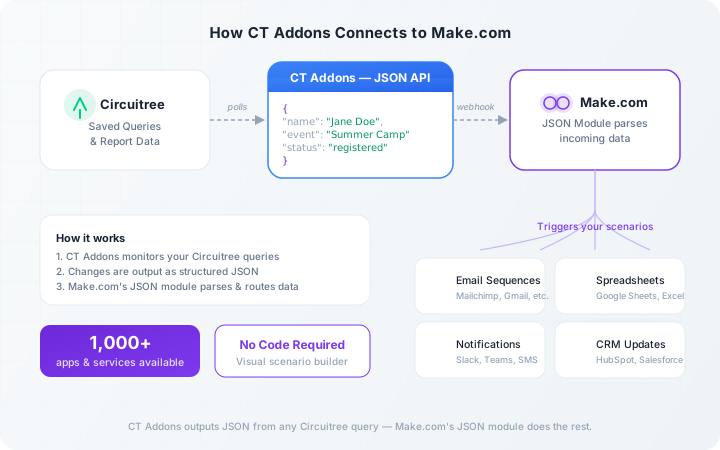
How Circuitree Connects to Make.com
CT Addons exposes your Circuitree queries as webhook-compatible data sources. Make.com polls for changes and executes your scenarios whenever data updates. Design multi-step scenarios with a drag-and-drop interface, conditional branching to route data based on registration type or event, and filters to process only the data that meets your criteria — all without writing a single line of code.
Example Automations for Circuitree Organizations
Automatically add new registrants to your Mailchimp mailing list
Send Slack or Microsoft Teams notifications when event capacity changes
Update Google Sheets with new registration data
Create CRM entries for new customers in HubSpot or Salesforce
Trigger email sequences based on registration status
Build multi-step workflows with conditional branching and filters
Route different registration types to different workflows automatically
Requires a Make.com plan that supports webhooks.
Zapier vs. Make.com — Which Is Right for You?
| Feature | Zapier | Make.com |
|---|---|---|
| Ease of use | Simpler, linear Zaps | More complex, visual scenarios |
| App library | 6,000+ apps | 1,500+ apps |
| Conditional logic | Basic paths | Advanced branching & filters |
| Pricing | Per-task pricing | Per-operation (often cheaper at scale) |
| Best for | Simple, one-trigger automations | Complex, multi-step workflows |
Both work with CT Addons' Circuitree integration. Compare with Zapier →
Frequently Asked Questions
Do I need to know how to code?
No. Make.com's visual scenario builder lets you design workflows by dragging and connecting modules — no coding required.
What Make.com plan do I need?
You'll need a Make.com plan that supports webhooks. Check Make.com's current pricing for the latest plan details.
How is this different from the Zapier integration?
Make.com excels at complex, multi-step workflows with conditional branching. Zapier is simpler for straightforward, linear automations. Both connect to Circuitree through CT Addons.
Can I build workflows with conditional logic?
Yes. Make.com supports routers, filters, and conditional paths — so you can route different types of Circuitree data to different actions automatically.
What Circuitree data triggers scenarios?
Any data available through a Circuitree query — registrations, financials, event updates, and custom queries.
Ready to build advanced Circuitree automations?
Get in touch to set up Make.com integration for your organization.
Contact Us